Mastering Unicode Conversion for Accurate Web Scraping
Web scraping is a powerful technique for gathering data from the internet, fueling everything from market research to content aggregation. However, any experienced scraper knows that the journey from raw HTML to clean, usable data is rarely straightforward. One of the most common and frustrating roadblocks encountered is character encoding issues, often manifesting as bizarre, garbled text known as "mojibake." Imagine trying to extract a company name and instead getting "üCompany" or "ÃProduct"—this is where Unicode conversion becomes not just helpful, but absolutely essential. Mastering this aspect is key to achieving accurate, reliable, and frustration-free web scraping, ensuring that every special character, accent, and symbol is captured precisely as intended.
The Encoding Maze: Understanding Character Sets in Web Scraping
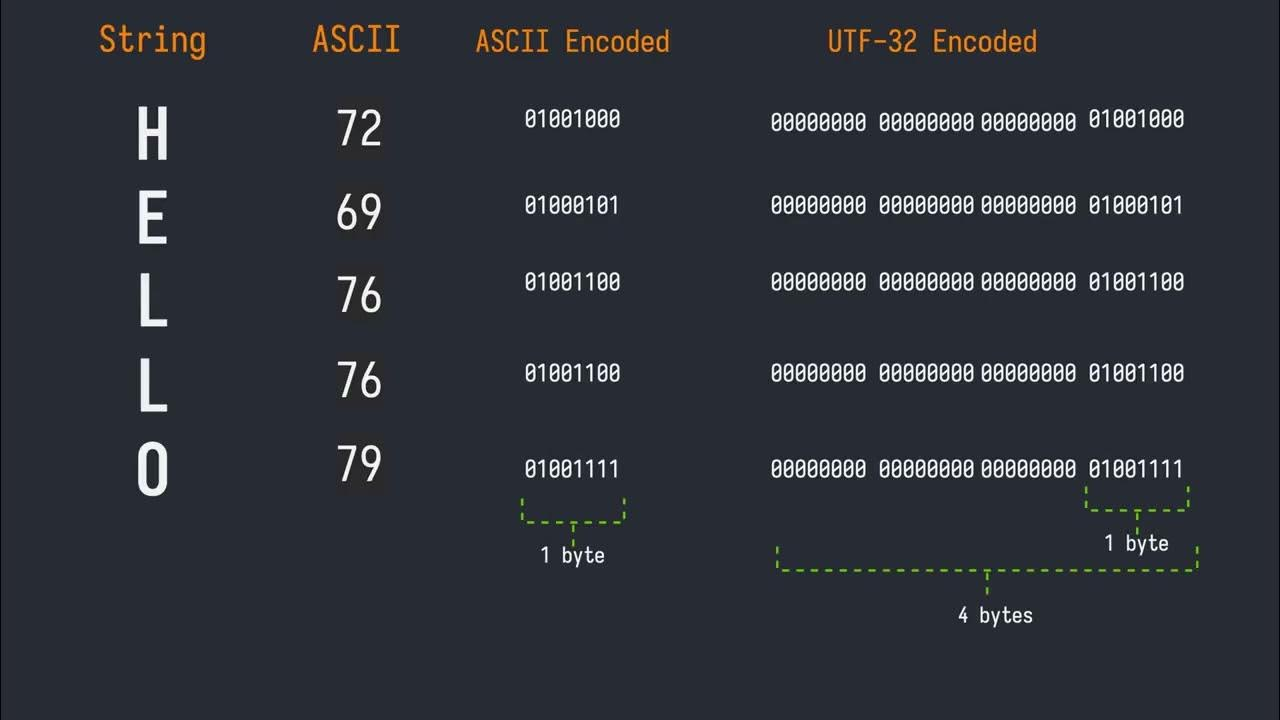
At its core, character encoding is the system used to represent text characters as numerical values (bytes) that computers can store and process. Without a universal agreement on these mappings, different systems interpret the same bytes in wildly different ways, leading to the dreaded mojibake. The web, being a global platform, is a vibrant tapestry of languages and scripts, each with its own set of characters.
Historically, various encoding standards emerged:
*
ASCII: The earliest standard, limited to 128 characters (English alphabet, numbers, basic symbols). Sufficient for American English but inadequate for most other languages.
*
Latin-1 (ISO-8859-1): An extension of ASCII, adding characters for Western European languages, bringing the total to 256. This is often where you'll see problematic characters like `ü` appearing when a system expecting UTF-8 tries to interpret Latin-1 bytes. For instance, the `ü` character (U+00FC) in Latin-1 is represented by the byte `FC`. If a system interprets `FC` as part of a UTF-8 sequence, it might misinterpret it, often leading to `ü`.
*
Windows-1252: A proprietary extension of Latin-1, widely used in Microsoft Windows, which adds a few more characters like smart quotes and euro symbols.
*
UTF-8: The undisputed champion of web encoding today. UTF-8 (Unicode Transformation Format - 8-bit) is a variable-width encoding that can represent *every character in the Unicode standard*. This includes characters from virtually all writing systems, symbols, and even emojis. Its backward compatibility with ASCII, efficiency, and flexibility have made it the dominant encoding, powering over 98% of the web. The character `Ã` (U+00C3), for example, is the Latin Capital Letter A with Tilde, and its appearance as mojibake often indicates a mismatch where a UTF-8 byte sequence is being incorrectly decoded by a non-UTF-8 system.
The core problem arises when the encoding used by the web server to send the data doesn't match the encoding your scraping script uses to interpret it. A website might declare its content as UTF-8, but due to a server misconfiguration or an old CMS, it might actually be serving content in Latin-1. Or vice versa. Understanding these disparities is the first step towards rectifying them. For a deeper dive into how special characters can impede your data extraction, consider reading
Decoding Web Content: When Special Characters Block Your Search.
Identifying and Handling Encodings in Practice
Accurate encoding detection is paramount for successful web scraping. Misinterpreting even a single character can corrupt data, break search queries, or lead to erroneous analysis.
How to Detect Encoding:
- HTTP Headers: The most reliable source. Web servers typically send a `Content-Type` header, which often includes a `charset` directive (e.g., `Content-Type: text/html; charset=utf-8`). Always check this first.
- HTML
<meta> Tags: Within the HTML document itself, especially in the `<head>` section, you might find a `` tag specifying the charset: `` (HTML5) or `` (older HTML/XHTML). Be wary, as this can sometimes contradict the HTTP header, with the header usually being the more authoritative source.
- Programming Library Detection: Libraries like Python's `requests` often attempt to detect encoding automatically. The `response.encoding` attribute in `requests` will show what the library determined. While generally good, it's not foolproof.
- Heuristic Guessing (
chardet): When explicit declarations are missing or conflicting, you can use libraries like `chardet` (a universal character encoding detector) to guess the encoding based on byte patterns. While remarkably effective, it's still a guess and should be used as a last resort or for validation.
Strategies for Correct Conversion:
Once you've determined the likely encoding, the next step is to convert the raw bytes into a consistent, usable format, typically Unicode strings in your programming language (e.g., Python's `str` type).
*
Explicitly Set Encoding: If `requests` gets it wrong, you can manually set `response.encoding = 'utf-8'` (or whatever you've detected) *before* accessing `response.text`.
*
Decode Bytes: For situations where you're dealing directly with byte streams, use the `decode()` method. For example, `response.content.decode('utf-8')` will convert raw bytes into a UTF-8 string.
*
Error Handling: When `decode()` encounters bytes that don't fit the specified encoding, it will raise a `UnicodeDecodeError`. You can handle these errors gracefully:
errors='replace': Replaces unconvertible characters with a default replacement character (often `�`). Useful for data cleaning but loses information.errors='ignore': Simply drops unconvertible characters. Can lead to data corruption if important characters are lost.errors='xmlcharrefreplace': Replaces problematic characters with XML character references (e.g., `ü` for `ü`).
A robust strategy might involve trying UTF-8, then falling back to `chardet`'s guess, and finally attempting `errors='replace'` as a last resort to at least get *some* text.
*
Validate Sample Text: After conversion, always inspect a small sample of the scraped text. Look for common mojibake patterns (`ü`, `Ã`, `’` for an apostrophe) to confirm your conversion was successful.
Tackling Tricky Characters and Edge Cases
Beyond the fundamental conversion of `ü` to `ü`, the world of Unicode presents a variety of nuances that can trip up even experienced scrapers.
Common Unicode Quirks:
- Non-Breaking Spaces: The HTML entity ` ` (U+00A0) is a common culprit. Often, sites use non-breaking spaces instead of regular spaces (U+0020) for layout purposes. While visually similar, they are distinct characters. If you're cleaning text, you might want to normalize these to regular spaces.
- Smart Quotes and Dashes: Straight quotes (`"`, `'`) and hyphens (`-`) are often automatically converted to "smart" curly quotes (`“`, `”`, `‘`, `’`) and em/en dashes (`—`, `–`) by word processors and CMSs. These are different Unicode characters and can cause issues in string comparisons or database storage if not handled consistently.
- Combining Characters: Some languages use diacritics (accents) that are represented as separate Unicode characters that *combine* with a base character. For example, `é` can be a single character (U+00E9) or a combination of `e` (U+0065) and an acute accent (U+0301). This can impact string length and comparison.
- Emojis: As websites increasingly incorporate emojis, scrapers need to be prepared for the wide range of Unicode characters they represent. UTF-8 is fully capable of handling emojis, but older encodings or improperly configured databases might struggle.
Normalization for Consistency:
To ensure consistent string comparisons, especially with combining characters, Unicode normalization forms are vital. The two most common are:
*
NFC (Normalization Form C): Composed form. Combines base characters and combining characters into single precomposed characters where possible (e.g., `e` + `´` becomes `é`).
*
NFD (Normalization Form D): Decomposed form. Separates all base characters from their combining characters (e.g., `é` becomes `e` + `´`).
Python's `unicodedata` module provides `normalize()` functions for this purpose.
Understanding these complexities is part of
Navigating Unicode: The Challenge of Extracting Specific Web Data, ensuring that the data you extract is truly accurate and usable.
Tools and Libraries for Seamless Unicode Handling
The good news is that modern programming languages and libraries offer robust support for Unicode, making the conversion process more manageable.
Essential Tools for Python Scraping:
- Python's Built-in String Types: Python 3 natively handles all strings as Unicode. When you `decode()` bytes, you get a Python `str` object, which is inherently Unicode-aware.
requests Library: As mentioned, `requests` is excellent for HTTP requests and often detects encoding automatically. Always check `response.encoding` and override it if necessary.BeautifulSoup: This powerful parsing library handles encoding during parsing. When you feed `BeautifulSoup` bytes, it will attempt to detect the encoding and parse it correctly. You can also specify the `from_encoding` parameter. If you need to output the HTML with a specific encoding, you can use `soup.prettify(encoding="utf-8")`.chardet: An indispensable library for situations where encoding isn't clearly specified. It analyzes byte sequences and returns a confidence level for various encodings.ftfy ("fixes text for you"): This library is a true lifesaver for "mojibake." It intelligently attempts to fix common encoding errors and character problems in text, often correcting garbled text that results from multiple layers of incorrect decoding/encoding.- Online Unicode Text Converters: While not a programmatic tool, online utilities that act as a "Unicode Text Converter" can be incredibly useful for debugging. You can paste problematic text and experiment with different source/target encodings to understand what's happening, or to manually convert small snippets of text before integrating the fix into your script.
By leveraging these tools effectively, you can build a robust scraping pipeline that withstands the diverse and sometimes messy world of web encodings.
Conclusion
In the landscape of web scraping, mastering Unicode conversion isn't merely a technical detail; it's a fundamental skill that underpins the accuracy and reliability of your data. From correctly interpreting bytes like `FC` that turn `ü` into `ü`, to understanding the broader implications of `U+00C3` or ` `, a deep comprehension of character sets is crucial. By diligently identifying encodings through HTTP headers and meta tags, applying the right decoding strategies, and leveraging powerful libraries like `requests`, `BeautifulSoup`, and `ftfy`, you can transform seemingly indecipherable mojibake into clean, usable data. Embrace the nuances of Unicode, and your web scraping endeavors will yield results that are not only abundant but also impeccably accurate.